One honest number for everything you’re saving toward.
Budget Forecast isn’t a guess or a flat “1% of your home’s value” rule of thumb. It takes what’s wearing out and what’s coming up, works out when each one is due, and works backward to a single amount to set aside every month. That’s a sinking fund, built from real numbers. Here’s how it gets there.
Free to use · No account needed · About 5 minutes to set up
Three steps to one monthly number
The same method works for a house, a car, a pet, a trip, or a goal you’re planning for. Skip the spreadsheets and the guesswork, and start anonymously right now.
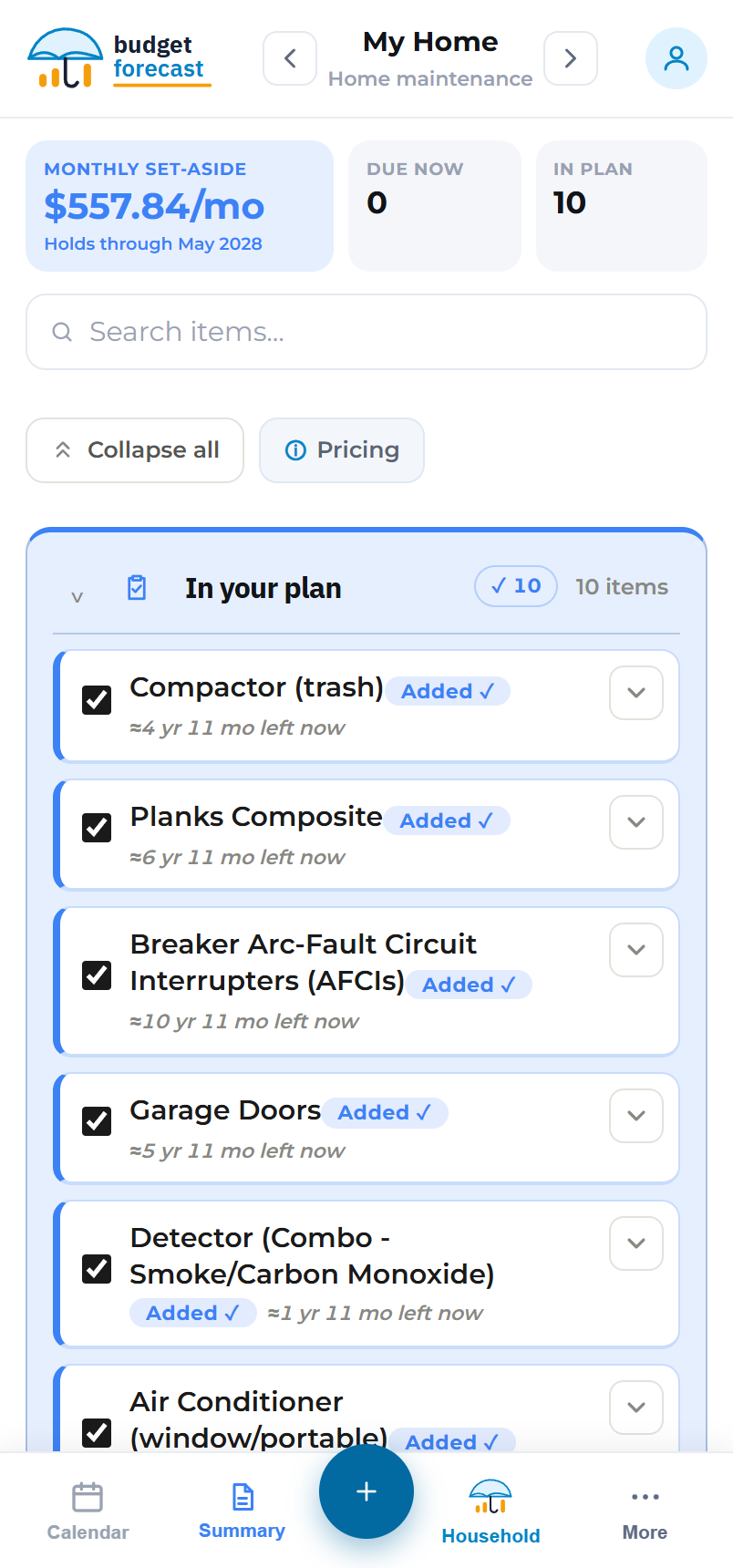
Pick what you’re planning for
Start with a budget type: home, vehicle, tech, pet, or travel. Check off what it includes and the typical costs are already filled in, so you’re not hunting for prices. Planning a one-off goal like a wedding or a new business? Build your own budget type, or let AI draft one from a sentence.
- ✓Five ready-made budget types, costs prefilled
- ✓Adjust any price or quantity, or mark an item DIY
- ✓Add custom line items, or build a whole custom budget type
Say when it’s due
A ten-year-old furnace isn’t a new one, and a wedding has a date on the calendar. Set how much life each item has left, or when a goal needs to be funded, and Budget Forecast builds a real timeline, then keeps it counting down on its own.
- ✓Enter years and months of life left, or a target date
- ✓Timelines age with the real calendar between visits
- ✓Items flag themselves “due now” when their time comes
Save one monthly number
Budget Forecast spreads each replacement over the months until it’s due, then adds them all up into one monthly amount. That’s a sinking fund for everything on your list, with a live summary, charts, a year-by-year savings schedule, and print or CSV export.
- ✓One combined monthly target that stays current
- ✓A projected balance chart and a year-by-year plan
- ✓Print it or export to CSV and take it to the bank

A number that tells you the truth
Most saving-ahead advice is a flat percentage or a round guess. Budget Forecast does the real arithmetic, and keeps doing it as life happens.
It counts down on its own
Every item has a timeline that ages with the real calendar. As replacement dates get closer your number adjusts, and anything overdue is flagged so nothing quietly slips by.
Priced for the future, not today
Each replacement’s cost is grown to its due date with inflation (2%/yr by default, and you can change it), so you’re saving toward the bill you’ll actually face, not last year’s price.
It updates the moment you do
Enter what you’ve already set aside and the monthly drops right away. Fall behind and it rises. It tracks your real situation instead of pretending you’re always on plan.
Funded by the due date, by design
The plan spreads each cost across the months until it’s needed, so the forward plan lands at zero right when each replacement comes due. It never shows a surprise shortfall.
Clear charts, not a wall of numbers
The summary report turns your plan into something you can actually read at a glance: where your monthly money goes, when the big expenses land, and how your savings balance climbs and dips over the years.
- ✓Where your monthly money goes, by category
- ✓A year-by-year view of when the big expenses hit
- ✓A projected balance line that builds and dips at each replacement

Add up your whole household
Keep a separate budget for the house, the car, the dog, the next big trip. Each runs on the same method. The Household view rolls them into one combined monthly number and a shared timeline of what’s coming, across everything you own.
- ✓One combined monthly set-aside across every budget
- ✓A shared timeline of upcoming expenses
- ✓A budget for each property and big-ticket item you own

Know what’s coming, month by month
Every upcoming replacement and goal lands on one shared calendar across all your budgets. Overdue items pin to the top, so you can see what’s due this month, next month, and further out, and tap any expense to jump straight to that budget.
- ✓One shared calendar across every budget
- ✓Overdue expenses pinned so nothing slips by
- ✓Tap an expense to jump straight to its budget

Keep a record of what you’ve replaced
When something gets replaced, mark it done and note what it really cost. Budget Forecast keeps a dated history for each budget, so you can compare real spending against the plan, and the item’s timeline resets on its own for the next round.
- ✓Record the real cost, not just the estimate
- ✓A dated history, grouped by year
- ✓Timelines reset for the next cycle automatically

Two ways to skip the blank page
Set things up the way that suits you: by hand, by describing it, or by building your own budget type.
AI-assisted setup
Describe your home (or your car, or anything else) in plain words, and AI drafts the components and typical costs. It also works for what isn’t built yet: a new baby on the way, a business you’re starting, a project with a deadline. Describe it, and it drafts a plan around the date. You review everything before it’s added, so you’re always in control. (A signed-in extra.)
Build your own budget type
We ship Home, Vehicle, Tech, Pet and Travel, but if you’ve got something we don’t cover, create a custom budget type with your own categories and colours, and the same method does the rest.
Free, private, and on every device
Free to use
Your first budget is free for as long as you like, with no sign-up wall or credit card. Pro adds more budgets when you need them.
Private by default
Your plan lives on your device. Create a free account only if you want it synced everywhere.
Works everywhere
Phone, tablet and desktop, with print and CSV export whenever you need a copy.
See your number in five minutes
Open the planner, check off what you own, and watch your monthly amount appear.
Open the planner →